Plans and limits
A new workspace starts on Free. There are four plans with these limits:
| Plan | Members | Active projects | Image storage | External participants |
|---|---|---|---|---|
| Free | Up to 2 | 1 | Up to 1GB | View and comment |
| Small | Up to 5 | Unlimited | Up to 10GB | Can also edit |
| Standard | Up to 10 | Unlimited | Up to 50GB | Can also edit |
| Team | Up to 20 | Unlimited | Up to 100GB | Can also edit |
Boards, the timeline, the shared page and AI connections (MCP) are the same on every plan. PDFs exported on Free carry the logo and “Made with Mockedule” at the bottom of each page, and view links from a workspace on Free show “Made with Mockedule” in the header. For teams of 21 or more people, get in touch through Contact.
Check your current plan and usage under “Billing” in Workspace settings. It shows how many internal members, active projects and how much image storage you use, with “At the limit” or “Over the limit” when you reach or pass a limit.
Who can change billing
- Only the workspace Owner can choose or change a plan, cancel, or update the card
- Admins can open “Billing” to see the current plan and usage. Ask the Owner when something needs to change
- Members and external participants do not see “Billing”
If ownership is transferred, the new Owner handles billing, and Stripe invoices and notices go to the new Owner’s email address.
Free trial
Your first subscription to a paid plan (Small, Standard or Team, monthly or yearly) starts with a 14-day free trial.
- A card is required to start
- You are first charged on the day the trial ends. If you cancel before then, you are not charged
- During the trial you get the limits of the plan you chose. “Billing” shows “Free trial” with its end date, plus the date and amount of the “First charge”
- The trial is available once per workspace, and not to an Owner who has already subscribed or used a trial in another workspace. Without a trial, the button reads “Choose (plan)”
Choose a plan
In a Free workspace, “Choose a plan” on the Billing page lists all four plans.
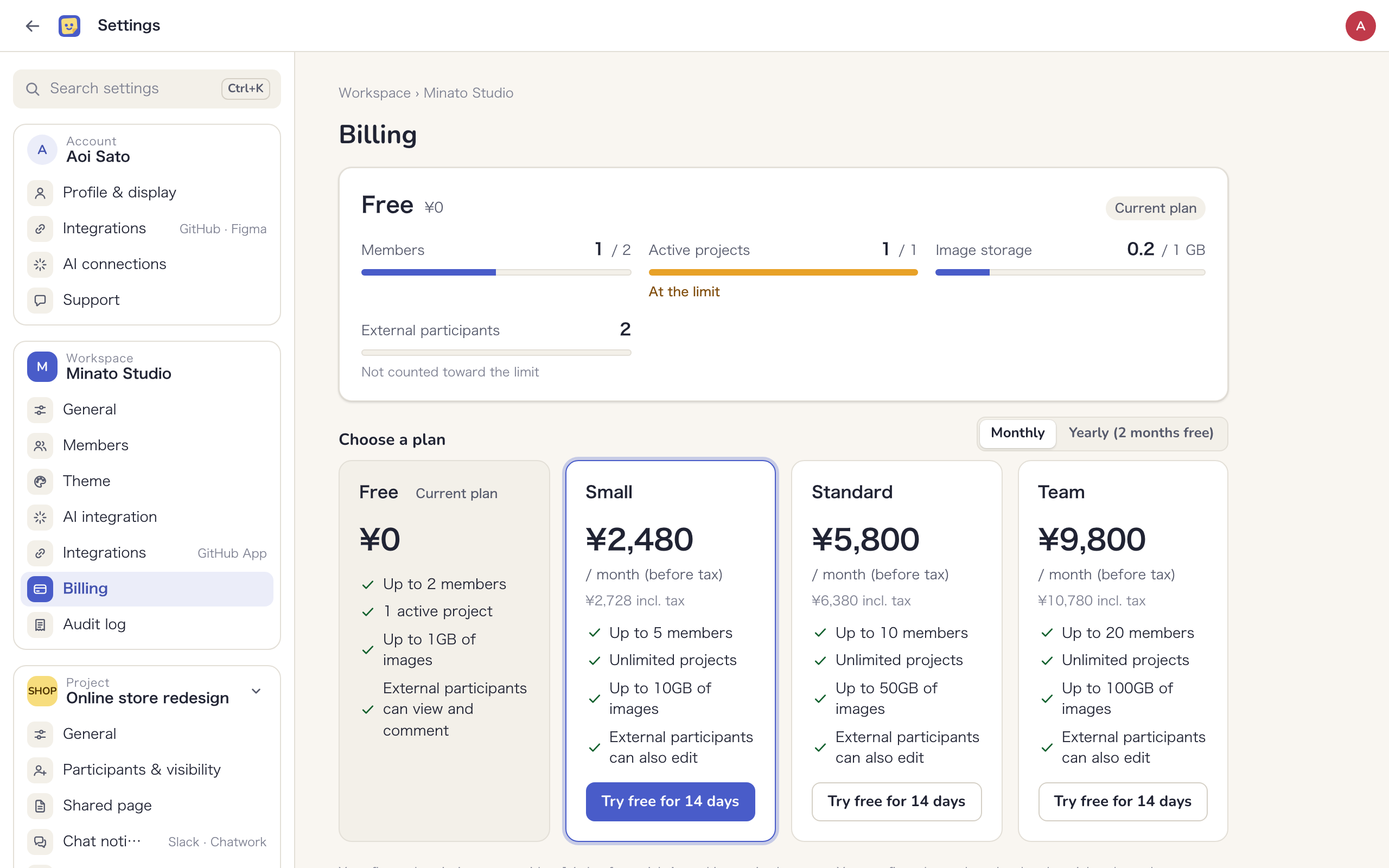
- Choose “Monthly” or “Yearly (2 months free)”
- Click “Try free for 14 days” on the plan you want (or “Choose (plan)” if no trial is available)
- Enter your card on the Stripe page and subscribe
- Back on the Billing page, “Waiting for Stripe to confirm” appears, and the new plan usually takes effect within a few seconds
If nothing changes after a minute, reload the page. If your payment went through, you will not be charged twice.
Change your plan
While you are on a paid plan, use “Change plan or billing” to switch plans or move between monthly and yearly billing.
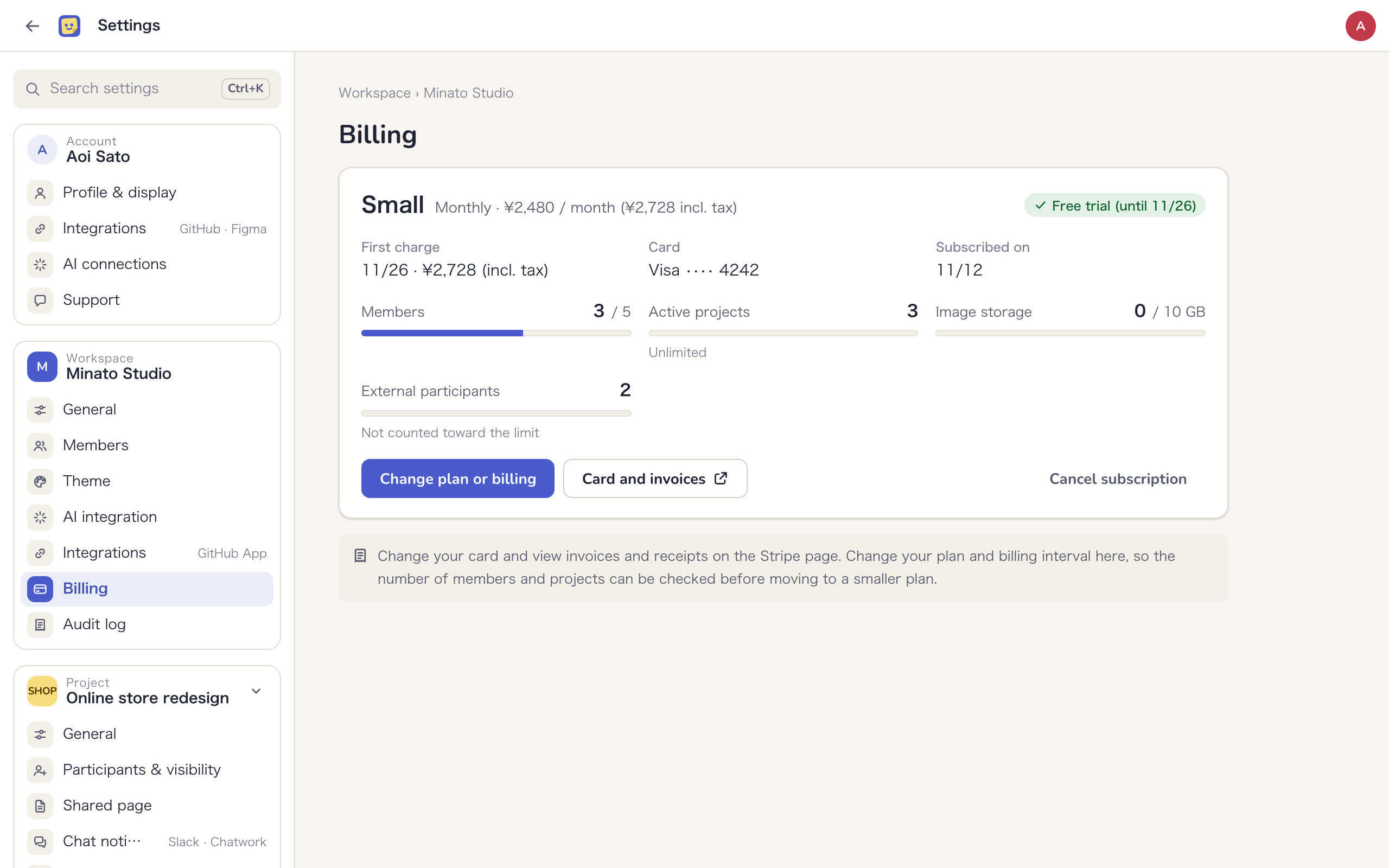
- Click “Change plan or billing”
- Choose a “Billing interval” and a “Plan”. You then see the difference due today, or the amount that will be credited against your next charge
- Click “Switch to (plan)”
- The new plan takes effect right away, and the difference is prorated. When you upgrade, the difference is charged to your card on file right away
- When you move to a smaller plan, the difference is not refunded; it is credited against your next charge
- You can move to a smaller plan only if your internal members, active projects and image storage fit within its limits. If they do not, you are told how many people, projects or GB to remove
- Changing plans during the free trial costs nothing today. Billing for the new plan starts when the trial ends
- You cannot change plans while a cancellation is scheduled or a payment has failed. Undo the cancellation or update the card first
Payment
Payment is by credit card only. Payment by invoice (bank transfer) is not available. You enter your card on a page hosted by Stripe, our payment provider, and Mockedule never receives the card number.
Card and invoices
Click “Card and invoices” to open Stripe in a new tab, where you can update your card and view and download invoices and receipts. Plan changes happen on the Billing page, not on Stripe, so the number of internal members and projects can be checked before you move to a smaller plan.
Noop, LLC. is not registered as a qualified invoice issuer under Japan’s invoice system, so these invoices and receipts are not qualified invoices.
If a payment fails
If your card cannot be charged, Owners and Admins see “Payment for (workspace) has failed.” below the header. The Owner can click “Update card” to change the card on Stripe. Admins do not see this button and should ask the Owner to check the card.
You keep your current plan in the meantime. Stripe retries the charge over the following days, and if payment keeps failing, the workspace returns to Free.
Cancel
- Click “Cancel subscription” on the Billing page
- In the confirmation dialog, check how long you can keep using the plan and what happens when the workspace returns to Free
- Click “Cancel on (date)”
- Cancellation takes effect at the end of the current period. Until then you keep your plan; then the workspace returns to Free and no further charges are made. If you cancel during the free trial, the workspace returns to Free when the trial ends and you are not charged
- Until the end of the period, click “Undo cancellation” to keep your plan
- Members, projects and boards are not deleted. While you are over the Free limits, you cannot add members, create projects, restore archived projects or add images
- Payments already made are not refunded, whether you move to a smaller plan or cancel
If the Owner deletes their account and the workspace is deleted with it, a paid plan is canceled immediately and the rest of the period is not refunded. See Account settings.
Image storage
The total size of images on boards has a per-workspace limit set by your plan (Free 1GB, Small 10GB, Standard 50GB, Team 100GB).
- Images on every board in the workspace count, including archived boards and boards in archived projects
- Once you reach the limit, you cannot add new images. Existing images stay visible
- Images deleted from a board are kept for 30 days so the deletion can be undone, and then stop counting. Deleting a board stops its images from counting
Your current usage appears under “Image storage” on the Billing page. If you run out, delete boards you no longer need or move to a larger plan.
External participants
Clients and people from other companies, such as outside engineers and designers, are never counted toward your plan, and you can invite as many as you like for free. The Billing page also shows “External participants” as “Not counted toward the limit”.
On Free, external participants can view and comment only (as “External viewer” or “Client”). To edit together with people outside your company, you need a paid plan. If you return to Free from a paid plan, existing External editors can keep editing. For roles, see Roles and visibility.